Solaura

Session Summary

Capture & Review
01
Conversation captured

The session record comes together.

Speech captured
↓
02
Summarised

Key themes and context, organised.

↓
✓
Saved for therapist review

Ready to check against the conversation.

Illustrative flow · AI output requires review

Session Progress

Connected Logs
SESSION 01Establish the context

Return to the conversation and its key themes.

SESSION 02Follow what changes

Revisit progress and therapist-authored homework.

NEXT SESSIONContinue with the full picture

Bring earlier work into the next conversation.

Context stays connected over time
Illustrative session history

AI Insights

Therapist Review
Critical MomentA shift worth revisiting
AI Insight 01A pattern to explore
AI Insight 02A focus for next session
Review before sharing.
EditDiscardShare
✓ Reviewed insight shared
Illustrative outputs · No actual data shared

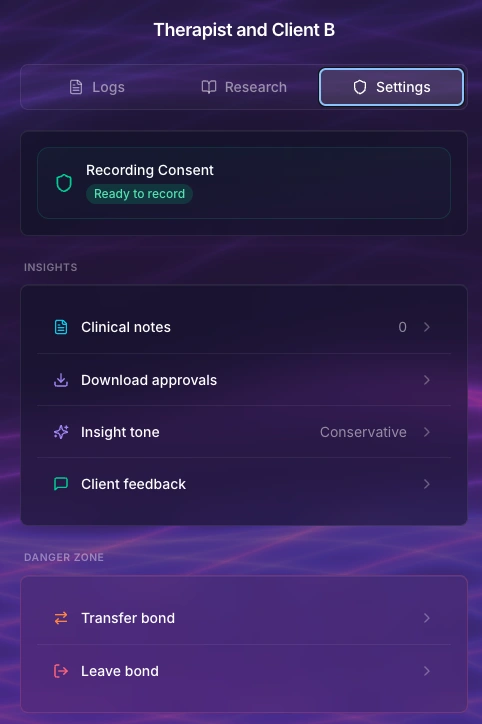
Recording Consent

Your Choices
Illustrative consent flow · No audio recorded
For therapists · Early access

Memory and progress tracking for therapy.

Turn consented conversations into a record you can revisit, insights you can review, and context for the next session.

Scroll to explore
A little less admin. More room for care.

More space for the work
only you can do.

01 / Client connection

Less note-taking pressure.
More room to connect.

02 / Practice capacity

Make room for more
people to receive care.

Less preparation overhead. More capacity to care.
03 / Richer perspectives

Your insight,
with more context.

Context to explore. Judgment that stays with you.
04 / Care stays human

AI keeps the record.
The therapist keeps the judgment.

See it in motion

Solaura in 38 seconds.

Our Mission

Starting
with therapy.

Building toward better continuity in human relationships.

Therapist-LedConsent-FirstHuman-Centred
01

Remember What Matters

Help therapists and clients return to the context of their conversations.

02

Recognise Progress

Make it easier to reflect on what changes across sessions.

03

Carry Care Forward

Connect each session to the next, with human judgment at the centre.

Therapist-Led Early Access

See how Solaura
fits your practice.

Tell us about your practice and what you’d like Solaura to help with.

SOLAURAEARLY ACCESS
Your practice.
A clearer next chapter.
Expression of Interest↗
  1. 01
    Tell us about your practice

    A few details help us understand what you need.

  2. 02
    Explore the fit together

    Discuss the workflow, setup, and pilot availability.

Your Next Step

Apply for Early Access

Start a conversation about your workflow and early-access availability.

Your email app opens with your details. Send the email to apply for early access.

  • We collect: name, email, role, practice numbers (clients/week, hours), note, browser info, hashed IP (spam protection).
  • Used only to contact you about early access and the pilot.
  • Emails are sent via Resend.
  • Kept until the pilot ends or 12 months, whichever is sooner, unless you join.
  • Ask hello@solaurai.com to delete it anytime.
← Back to Solaura
Privacy & Consent

Your Sessions.
Your Choices.

Understand the path your conversation takes—and the choices you keep at every step.

A Shared Choice

Permission comes
before recording.

Recording consent starts unticked and is reconfirmed before each therapy session. Research and licensing are separate, optional decisions.

  1. 01

    Audio → Transcript

    AssemblyAI and Sarvam AI (for Indian languages) turn session audio into text. Named providers process session audio and text only to create transcripts, summaries and insights. Staff access is limited.

  2. 02

    Transcript → Session Record

    A summary and suggested insights are drafted after the session. The transcript and summary live in Logs, where you can open or delete them.

  3. 03

    Therapist Review → Shared Insight

    The therapist reviews, edits, discards, or shares each suggestion. Clients never see pending or rejected insights. Nothing is shared automatically.

01 / Optional

Research

Research use remains off unless you choose to opt in.

02 / Optional

Licensing

Sharing with outside labs requires its own separate opt-in.

03 / Your Record

Export or Leave

Export your data or delete your account in the app. Deletion completes within 30 days. Sessions your therapist owns stay in their clinical record; you lose access. Consent records are kept for 1 year, unlinked from you. You can also manage download approvals, revoke consent or leave the bond.

04 / Defined Access

Adults 18+

Solaura is for adults 18+ for now. Early-access pilots are for adult clients.

← Back to Solaura
How We Use AI

More Context.
Human Judgment.

A record captures what was said. An insight suggests what it might mean. Your expertise connects the two.

The Record

What was said.

Transcription and summarisation help you revisit the conversation. Check the record: speech can be misheard and context can be missed.

The Perspective

What to explore.

An insight is a working hypothesis for the therapist to assess. It may be incomplete or wrong; the supporting conversation and your judgment matter.

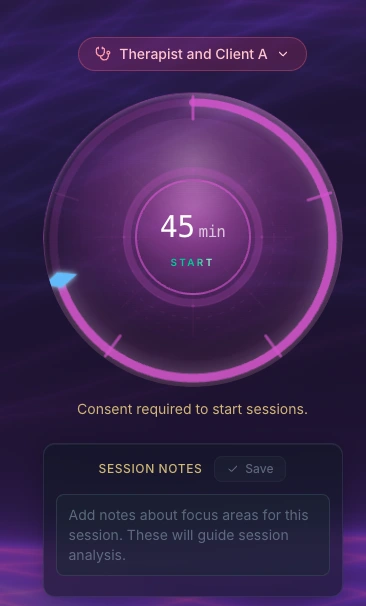
Add a focus in the notes beneath the session timer to guide what the AI considers when analysing the conversation.

  1. 01

    Review

    Compare the suggestion with the session record.

  2. 02

    Refine

    Add nuance and your professional context.

  3. 03

    Decide

    Discard what does not fit. Choose what is useful.

  4. 04

    Share

    The client sees only what you choose to share.

Therapist Authored

Homework stays human.

Homework is written by your therapist.

Client Feedback

Another perspective on fit.

Clients can mark a shared insight as helpful or unhelpful. This helps the therapist understand whether it resonates; it is not a measure of clinical accuracy.

Solaura supports documentation and reflection. It does not diagnose or provide emergency care. See Processing Details ↗

← Back to Solaura
Questions & Answers

A Little More Clarity.

Sessions, privacy, and getting started. Find the details you need.

Sessions & Access

Does Solaura record our sessions?

Only with recording consent.

It starts unticked, and it's re-confirmed before every therapy session.

Who can see transcripts and summaries?

The therapist and the client in that bond.

Named providers process them only to create transcripts, summaries and insights. Staff access is limited. Solaura is for adults 18+ for now.

How do clients join?

Their therapist invites them.

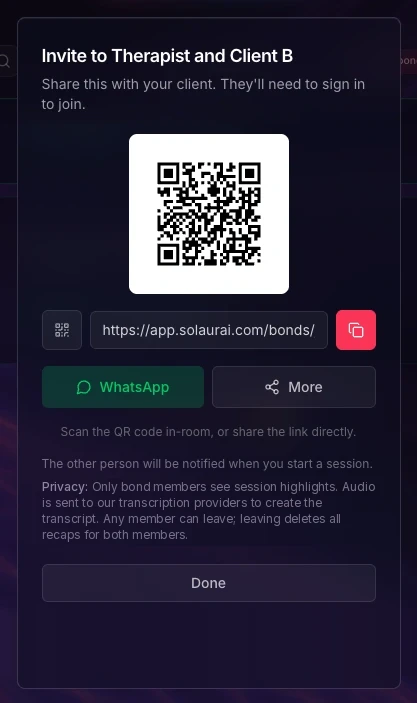
By invite link, QR code or a WhatsApp message.

In person or online?

Check the recording setup in your demo.

In-person conversations need a microphone that captures both voices clearly. Online sessions need the call audio available to the recording input; a microphone alone may miss the remote speaker. We can review the setup for your practice before a pilot.

Consent & Data

Where does the audio go?

To named transcription providers.

AssemblyAI and Sarvam AI (for Indian languages) transcribe audio, and may process it outside India. Named providers process session audio and text only to create transcripts, summaries and insights. Staff access is limited. Data is stored in Tokyo, Japan.

Read the processing details and what to confirm before a pilot →

Is my data used for research?

Only if you opt in.

Research use and licensing to outside labs are separate, optional choices that start unticked. You can change them in Settings at any time.

Can I take my data with me, or leave?

Yes, in the app.

Export your data, leave the bond, or delete your account. Deletion completes within 30 days. Sessions your therapist owns stay in their clinical record; you lose access. Consent records are kept for 1 year, unlinked from you.

What should my practice verify?

Confirm the processing arrangements.

Your pilot onboarding should include the processing providers, storage locations, access controls and retention schedule for your deployment, alongside the applicable privacy and data processing terms. Review these before the first recorded session.

AI & Review

Do AI insights go straight to the client?

No. The therapist reviews each one first.

Insights are shared, edited or deleted by the therapist. Clients never see pending or rejected insights.

Can I rely on AI without checking?

Always apply your professional judgment.

No. Transcripts may mishear speech, summaries may omit context, and suggestions may be wrong. Check the record and apply your professional judgment. Solaura supports documentation and reflection; it does not diagnose or provide emergency care.

Getting Started

What does it cost?

Early access for your practice.

Ask about current availability, pricing and usage limits for your practice. Write to hello@solaurai.com.

← Back to Solaura
For Clients

Your Conversation.
Your Choices.

Your therapist may invite you to Solaura to keep a record of your sessions. Here is what to expect.

01

Join Through Your Therapist

A bond is a private space shared with your therapist. Join through their invitation link or QR code to keep session records and shared work together.

02

Choose Whether to Record

Recording consent starts unticked and is reconfirmed for each session. Discuss questions with your therapist before recording begins.

03

Receive Reviewed Insights

Your therapist can share, edit, or discard AI suggestions. You see only what they choose to share. Homework is written by your therapist.

04

Keep Control of Your Record

Export your data or delete your account in the app. Deletion completes within 30 days. Sessions your therapist owns stay in their clinical record; you lose access. Consent records are kept for 1 year, unlinked from you. Research and licensing are separate opt-ins.

Explore Privacy & Consent ↗
← Back to Solaura
Website Terms

A Clear Starting Point.

This website is a product demonstration for Solaura’s early-access work.

Before Using Real Session Data

Review the applicable agreements.

This page describes the website demonstration. It is not a therapy service agreement or a data processing agreement. Read the app’s Privacy Policy and Terms before using Solaura with real session data.

Solaura is a reflection tool. It doesn't diagnose or treat any condition and isn't a medical device. Summaries and insights are made by AI and may be wrong or incomplete, so don't take them at face value. For clinical decisions, talk to a qualified therapist or doctor; for legal matters, talk to a lawyer. Solaura outputs are not clinical or legal records and aren't intended for use as evidence or in legal proceedings.

Request Service Terms ↗
← Back to Solaura

How The App Works

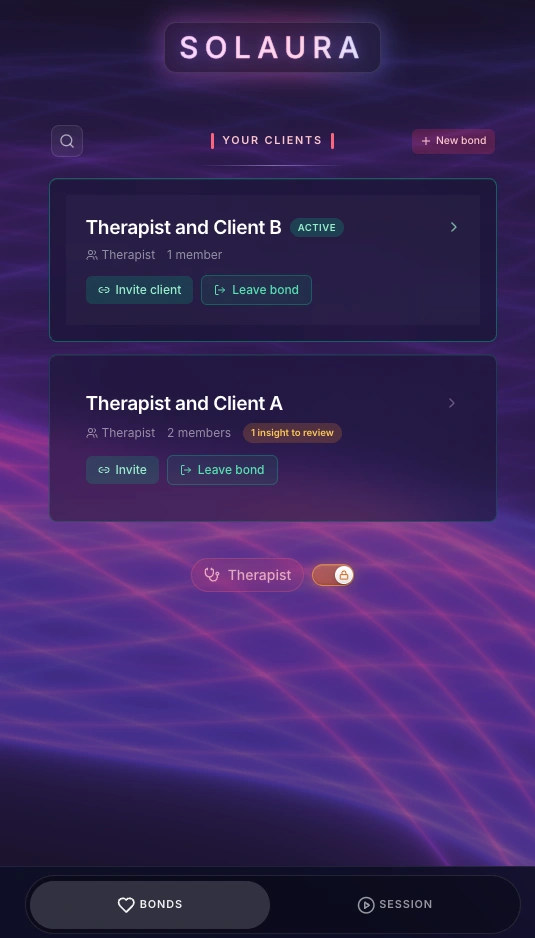
01 / Bonds

Your Client Connections

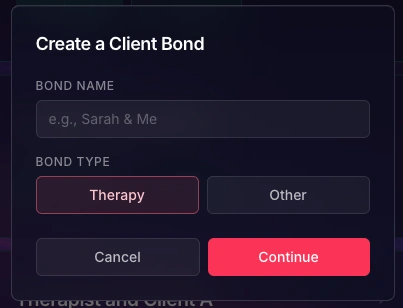
Keep each client relationship in its own bond. See your active connections and open the space for the person you are working with.

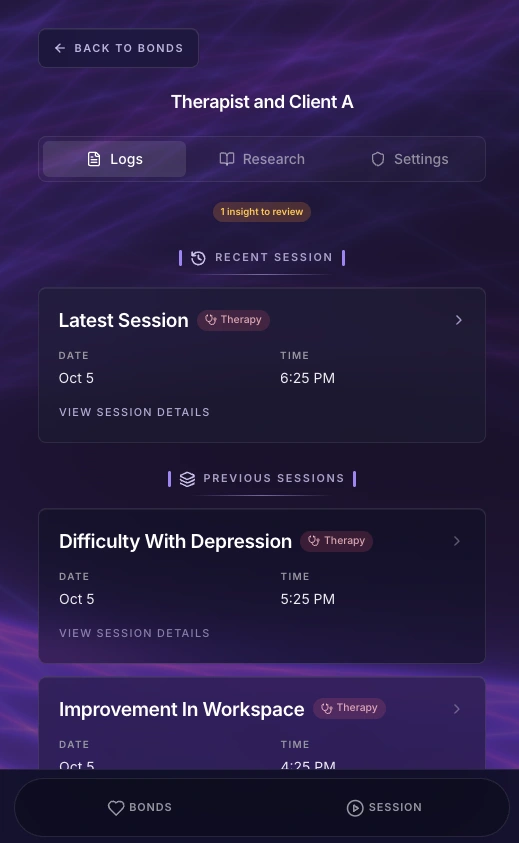
Actual App Screen · Early Access

Bonds screen showing two client connections

Step 1 of 7 · Bonds

Press Escape to close